What Is EchoStreamHub?
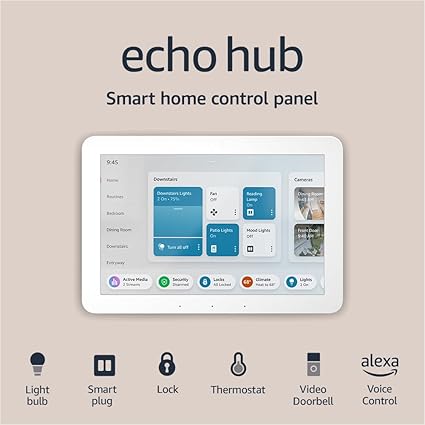
EchoStreamHub is our UX-forward approach built around Amazon’s Echo Hub: a wall-first, glanceable controller that consolidates lights, climate, locks, cameras, and scenes. It ditches the “tablet-on-a-wall” problems—random updates, cluttered chargers, kiosk mode juggling—and behaves like a reliable home appliance.
- Wall-first design creates consistent household habits.
- Matter + Zigbee widens compatibility now and later.
- Alexa routines convert multi-step chores into one-tap scenes.
Hooks That Make You Actually Use It
Arrive / Leave
One chip to set lights + climate + security as you pass the hallway. Beats three separate apps.
Kid Night Mode
Dim the home, arm cameras, white noise, “Do Not Disturb” after bedtime.
Doorbell + Camera Grid
Pin 4–6 most-used video tiles with two-way talk for fast checks.
Energy Saver
Cut power to non-essentials, eco nudge the thermostat, switch scenes before you leave.
Setup: Box to Wall in an Hour
- Pick a path you pass 10+ times/day (entry or hall). Habits win.
- Mount the plate with nearby power. Renting? Use a tabletop stand.
- Connect Wi-Fi → sign in to Amazon → auto-discover devices.
- Organize by rooms and routines, not brands.
- Pin 6–8 tiles for the first screen; hide the rest behind “More.”
Tip: if pairing is flaky, put IoT on a dedicated 2.4 GHz SSID.
Performance & Daily Use
Motion wakes the screen, tiles respond fast, and voice remains excellent for zero-UI actions (“Alexa, lock the front door”). The on-wall dashboard wins for shared household context—everyone can see what’s on and what’s armed without opening phones.
Privacy, Security & Guests
- Hide camera previews when idle; require PIN for unlock/garage scenes.
- Create a Guest view (lights + climate only) for sitters and visitors.
- Review Alexa activity weekly; remove stale routines and unused devices.
Pros & Cons
👍 What We Love
- Appliance-like reliability vs. “tablet on a wall” hacks
- Matter + Zigbee = broad compatibility
- Fast tiles and routine chips reduce friction
- Household-wide glanceability builds adoption
👎 Tradeoffs
- Requires constant power and Wi-Fi
- Not a general-purpose tablet (by design)
- Best value if you’re already using Alexa devices
EchoStreamHub vs. Alternatives
| Echo Hub focus | Wall-mounted, Alexa-first dashboard; appliance-like behavior |
| Tablet on a wall | Flexible apps but constant OS upkeep, chargers, and kiosk friction |
| Voice-only speakers | Hands-free but zero glanceability; low family adoption for routines |
Key Specs (At a Glance)
- Touchscreen home dashboard
- Alexa built-in; routine chips; device tiles
- Matter & Zigbee for wide compatibility
- Wall-mount primary (tabletop optional)
- Camera tiles w/ two-way talk
- Wi-Fi required for most features
Pricing & Value
We score value by behavior change. If EchoStreamHub replaces scattered controls and gets your family using scenes daily, it earns its spot. Starting from zero? Bundle two rooms of smart bulbs and a thermostat so your dashboard has real tiles on day one.
Real-World UX Tips
- Limit first screen to 6–8 tiles; put everything else behind “More.”
- Use icons + plain labels: “All Lights,” “Bedtime,” “Leave Home.”
- Create room-level controls first; then add brand-specific tiles.
- Pin doorbell/camera tiles near the top in busy entryways.
FAQs
Is this a replacement for Echo Show?
Different intent. Echo Show is a general display; Echo Hub is a purpose-built controller.
Will it work if the internet goes down?
Some local control may work via supported standards; cloud and voice will be limited.
What locations work best?
Entryway or hallway you pass often—so it becomes a habit, not a novelty.
Verdict
If your home runs on Alexa, EchoStreamHub is the cleanest path to a calmer smart home. It’s not a tablet replacement—that’s the point. Mount it once, use it hundreds of times a day.